
What it's for
Central Services is your church's schedule. Schedulers make the services and ask people from the worship and production teams to serve, and everyone can see who's serving and answer yes or no.
The church account, the main admins and the admins open straight onto the whole schedule. A main admin can pick up to four schedulers from the main admins and admins, and those are the people who make services and ask people. Until someone picks them, all the main admins and admins can schedule.
Everyone else opens on My requests, where they press Accept or Decline.
Everyone can see every team, who's on it, their role, and who said yes or no. Requests go out by email as well, so people who never open the app can still answer.
Slots
Central Services uses slots instead of keys. Each person on your teams takes one slot, and the church account doesn't take any. If you take someone off every team, their slot is free for the next person.
Each pack comes with slots. Lite has 15, Regular 18, Plus 20 and Ultra 30, and Ultra can add 10 more for $35. Extra slots are $5 each, paid once, and a main admin or admin buys them on the website. Schedulers can see how many are in use at the top of the Teams screen.
Getting in
- Get the app for Windows, Mac, Linux or Android from the install page, or open Central Services on the website in any browser.
- Sign in with the Motion Audio account from your church's invite. That's how it knows who you are and which church you're in.
- If you're a main admin or admin, you'll also get a 6-digit code by text the first time on each device. Add your mobile number when it asks.
Not in a church yet? Ask your main admin to add you on the website's Teams page, or join with your church's code when you make your account.
My requests
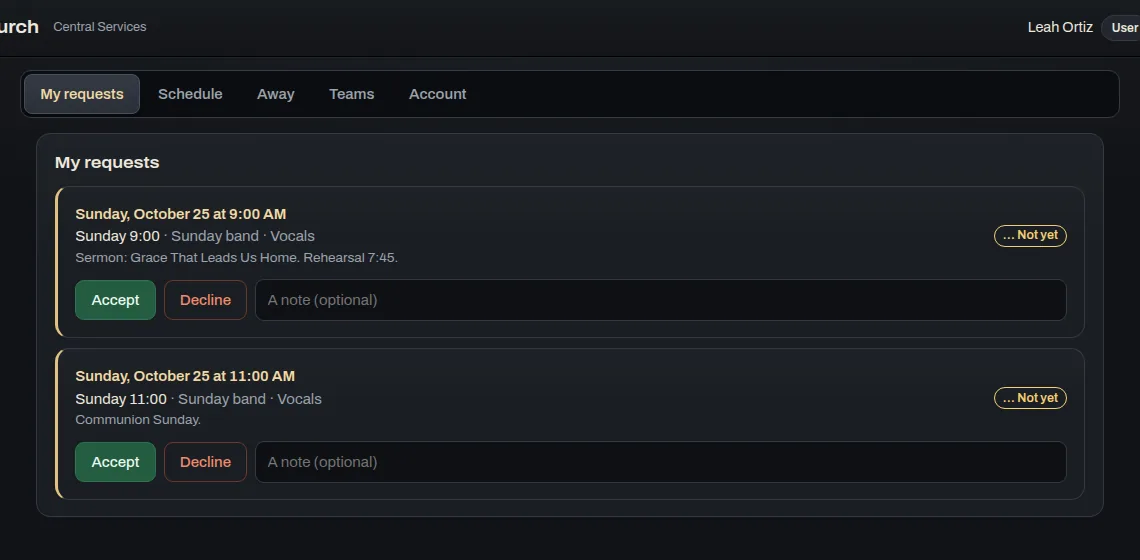
This is everything you've been asked to serve at, with the date, the team, your role and any notes. Press Accept or Decline, and add a note if you need to, like "I can only do the second service".
The day before, from 9 a.m. (or as soon as the service is less than 18 hours away), people who said yes get a reminder with their role and the notes. Anyone who hasn't answered gets a nudge. People who said no don't get anything, and nobody gets the same reminder twice.
Schedule
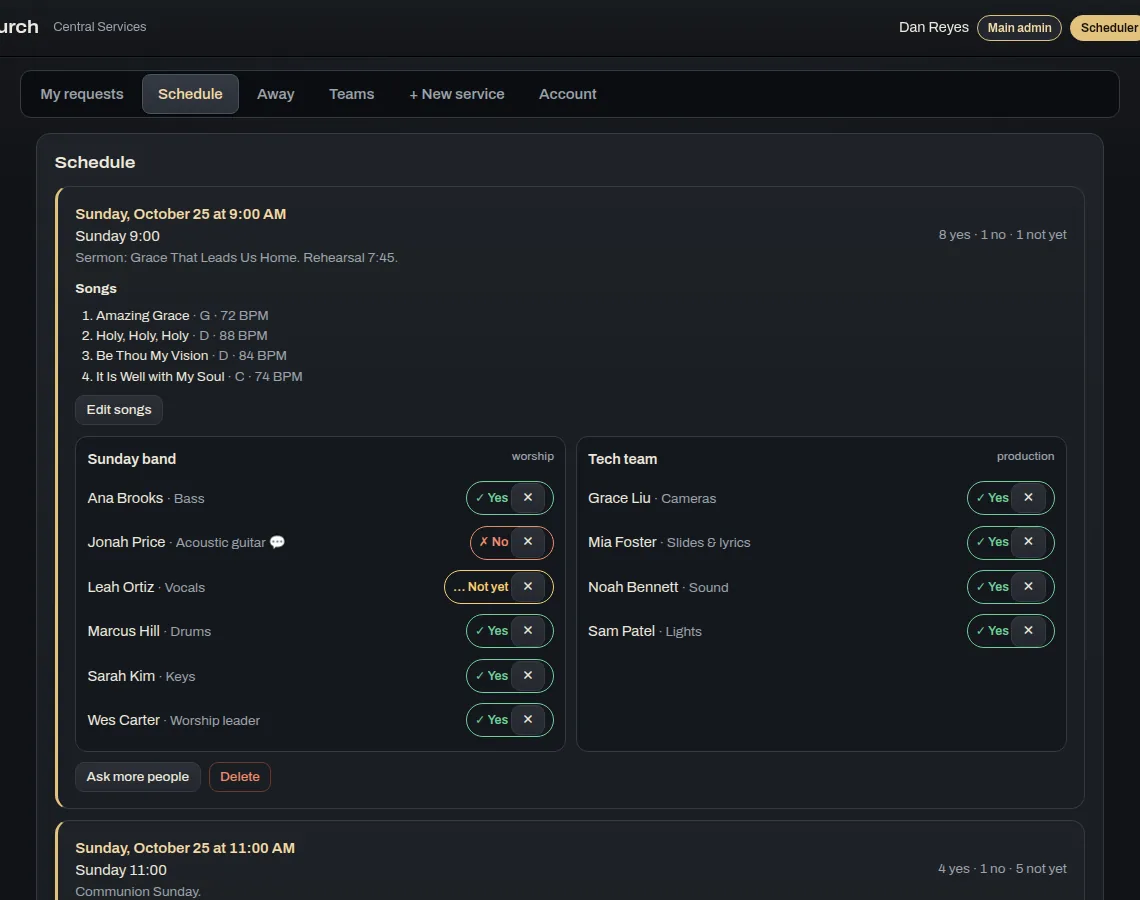
The schedule lists the services coming up, with the date, title, notes and song list, who's away that day, and each team's people with their answers. Schedulers also get Ask more people, ✕ to take someone off a service, Edit songs and Delete.
Making a service (schedulers)
- Press + New service. Give it a title, a date and time, and notes if you want.
- Add the songs, one per line, with the title, key and BPM. They go in the request email and the reminder the day before.
- Pick who to ask, either whole teams or particular people. You'll see who's away that day, and asking a whole team leaves them out.
- Press Save. Everyone you asked gets an email and sees it in My requests.
Away
Mark the days you can't serve with a first day, a last day and a note, like "Vacation". Schedulers can see you're away, and asking a whole team leaves you out on those days. If you had a request for one of those days that you hadn't answered, it turns into a no. Schedulers can mark someone else as away too.
Teams
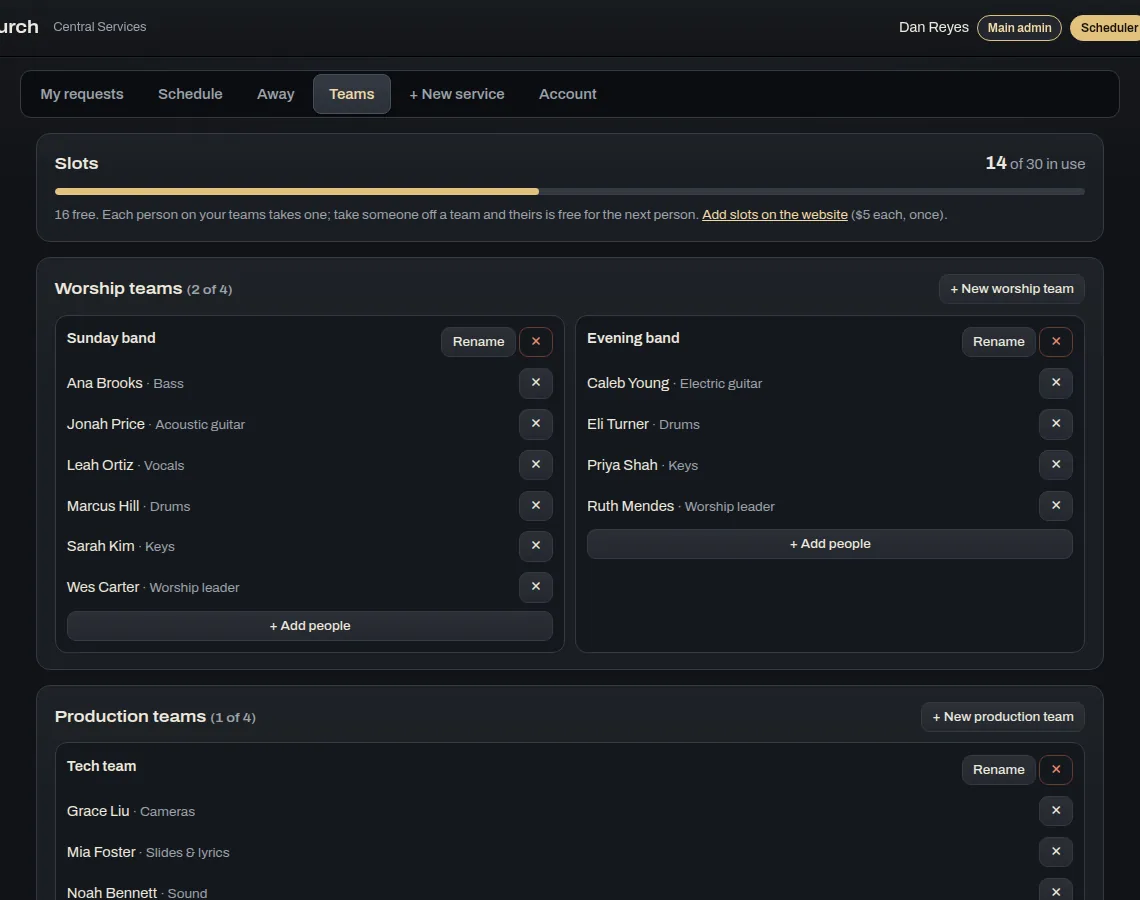
You can have up to four worship teams and four production teams. Schedulers make a team with + New worship team or + New production team, and can Rename or remove one with ✕. To add someone, press + Add people and type their name, email and role, like Bass or Lights. The ✕ next to a person takes them off that team.
This is also where a main admin chooses the schedulers, up to four from the main admins and admins. The top of the screen shows how many slots are in use and how many are free, with a link for main admins and admins to add more.
Account and app settings
Account has the privacy policy, Contact support and Delete my account. When you contact support, a person on our team writes back by email. In the apps, ⚙ App has the website's address and updates. The computer apps can install a new version by themselves when they open.
Troubleshooting
- It says "Your church doesn't have Central Services yet." A main admin or admin needs to get slots on the website. Each pack comes with some, or they're $5 a person.
- All the slots are in use. Take anyone who no longer serves off the teams, or add slots on the website.
- You didn't get the email. Check your spam folder, then open My requests in the app or on the website. Everything's there too.
- You forgot your password. Press Forgot password? on the sign-in screen.